Showing posts with label Digital Citizenship. Show all posts

Saturday, July 16, 2016

The State of Digital Citizenship

The Big Four
Over the years I have worked hard at providing a reliable environment to support K-12 staff and students in a relevant and meaningful learning community. A simple rule of thumb that I have done my best to follow is focusing on what I have called, "the Big Three". The Big Three is made up of three categories: infrastructure, devices, and professional development. As the years have passed and mobile devices have found their way into the hands of all staff and students, the Big Three is no longer enough, enter the new “big” on the block, digital citizenship.
Digital citizenship is not new, but in many cases it has not been part of the foundation when creating technology plans, nor has it been part of the conversation at administrative team meetings. However, we can no longer ignore that the number of student devices in the classroom is on the rise. By the 2016-17 school year, half of all school districts in the US will be 1:1 with mobile devices, according to Futuresource Consulting. This fact, combined with the decreased cost of mobile devices, means that digital citizenship must be taught and addressed.
Where Are We?
In the state of AZ, Jeff Billings, technology director at the Paradise Valley School District, has generated a bit of buzz around digital citizenship. Billings has created the Arizona Digital Citizenship Statewide Data Collection Project and hopes to have all students in the state represented when the project is complete. He has already collected data from over 250,000 students; the plan is to begin sharing the data next fall after the results have been disaggregated. The goal is to have a reliable source of information on digital citizenship across the state and promote further discussion and collaboration.
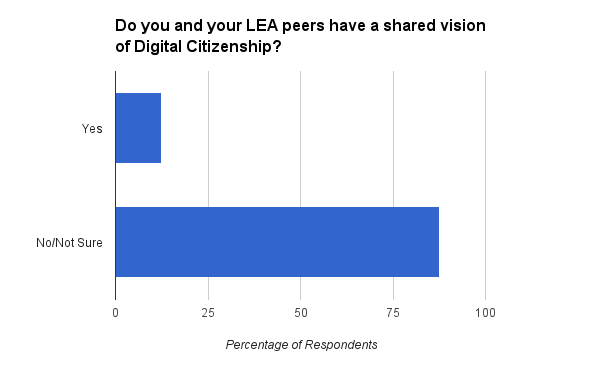

The picture painted by some of the early data shows that the local education agencies are at various places with respect to a shared vision of digital citizenship implementation in the classroom. It appears that a shared vision within districts is not the norm, which should prompt concern among all stakeholders. The way in which respondents prioritized the eight elements of digital citizenship is also notable. To be consistent in the delivery of digital citizenship, is any element more or less important than the other?
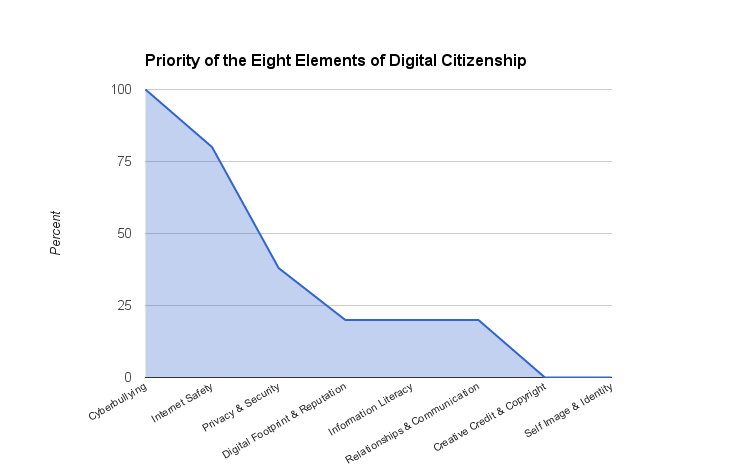
This project holds promise for bringing together districts from across Arizona and providing talking points that could lead to positive collaboration and common language among educators. We should applaud the effort and look forward to the data.

Moving Forward
It is becoming clearer everyday that digital learning is on the rise, even if our schools do not provide these opportunities. The 2014 SpeakUp Survey showed that 75 percent of students think every student should have access to a mobile device during the school day to support learning. Many of them have taken matters into their own hands, as 58 percent already use their own smartphones in class and perform such tasks as taking photos of assignments and textbook pages.
So where do we start with such an overwhelming responsibility that affects our classrooms and the teachers that ultimately set the example for our students? A quick Web search will return numerous sites with digital citizenship resources. Common Sense Media is a popular choice and offers scope and sequence materials that are age appropriate for the classroom and a certification program for educators and schools. It takes much more effort, however, to find actual programs that exist in schools-examples of digital citizenship embedded in those teachable moments that are so relevant to our students. We need to shared successful programs and hold them up as models for others to see (#digitalcitizenship).      


A Partnership
Digital citizenship is no different from good citizenship in general-the only distinction is the medium where that community exists. If we expect our students to be responsible members of the digital community, we have to collaborate with all stakeholders to create successful learning opportunities, encourage parental support, lead by example, and include our students in that discussion. Technology is no longer a once-a-week event or a trip to the computer lab; it is embedded in our classroom and personal environments. It will take more than the librarian or tech teacher to instill the values of digital citizenship into the lives of our students and make good digital citizenship part of the Big Four.

Thursday, June 30, 2016

The ISTE Blues

Data Overload
Like most of us returning from ISTE, you are probably experiencing the emotional roller coaster ride that accompanies the flight or drive home. The data overload from the content filled sessions, keynotes, poster and playground spaces, and endless conversations can be overwhelming. It is possible to keep the "ISTE's Over Blues" from setting in, but do not put it off for later, jump into your content while it's fresh and take charge! 

From the Middle
It doesn't matter what your role is in your organization, you have just spent four days gathering content that you need to share. Take the lead from the middle approach and decide how you can share what you have learned with your peers, administration, technology staff and any others that could benefit from what you have learned. This could also be an opportunity to use a new medium to share information with a presentation platform, blog site, or creative new app that you experienced at the conference. With the pace at which new technologies and classroom practices evolve, technology, curriculum, and professional development teams will appreciate the benefit of the information you provide. 

Stay in Touch
I have said a number of times that the best place to make connections at ISTE is standing in line waiting to purchase that delightful ice coffee or refreshing bottle of water. I do suggest we change the phrase "standing in line" to the "PLN line", because we ultimately exchange email addresses, Twitter and Instagram handles and district names for future collaboration, with educators from around the globe. Now that you have these new contacts, don't hesitate to reach out and continue the conversations and sharing of ideas that you started while waiting in that PLN line.
The power of social media can assist, so take advantage of the new account you just created in those power sessions and use the #ISTE2016 hashtag to share with your new friends. 

Bring ISTE Home
Coming together with 15,000 like minded educators is something magical that ISTE has
managed to create for many years. What many ISTE members may not be aware of is the ISTE affiliate groups that exist in virtually every state in our country, as wells as international affiliates in Australia, Canada, Europe, India, The Philippines, and the United Kingdom. These affiliate groups are all a bit different and have a variety of benefits and professional development opportunities that happen year around. Joining a local affiliate is another way to continue to grow your PLN, attend events in your state and become involved with advocacy movements that can directly affect your classrooms and students. To find an affiliate in your area, check out the affiliate directory and continue making connections!

Small World
CC BY-SA 3.0
Staying relevant in a world continually growing smaller is not an easy task and each new generation of students brings a fresh mindset that as educators we must be able to connect with. Attending events like ISTE, connecting with others through social media, and remaining outside of the four walls of our classrooms, cubicles and offices, will allow us to continue growing and remain the most important part of the classroom. See you in San Antonio! 

Saturday, April 23, 2016

The Big Four

CC0 1.0
Mix IT Up
There was a time when I would focus my discussions with others on how important infrastructure is when planning any type of technology integration project. My opinion on the importance of infrastructure has not changed over the years, however the conversation about the other ingredients that must go into the foundation for integrating technology in our classrooms are not independent of the infrastructure. As relevant as it is to have a robust network backbone and a great Internet connection, that by itself will not give our students the opportunities they need to be successful when they leave the K-12 environment.

Creating the right mix that goes into the foundation for integrating technology in our classrooms is similar to the science of creating the perfect batch of concrete that supports our houses, buildings and roads. The science used to arrive at the finished product is far more complicated than buying a few bags of concrete at your local Home Depot for the backyard swing set. Building a foundation for today's digital learners is as important as the base for the tallest skyscraper, and requires the proper mix of four key ingredients that I believe are critical for our classrooms. Let's take a look at the ingredients in no particular order.


Professional Development
Historically PD is the afterthought when integrating technology in our classrooms and becomes the first reason cited for technology integration failure. The excitement of having support to integrate the devices often allows a structured PD plan to be pushed aside, making it difficult to play catch up. If our foundation is going to hold up, we need our technology and curriculum departments working collaboratively with our site leaders, teachers, students, and parents to craft a PD plan. One way to accomplish a baseline for building a plan across all stakeholder groups is to leverage data. Participating in a survey, such as Project Tomorrow's Speakup Survey, allows educators, students, and parents to have feedback on their current and future technology use in education. The data provides starting points for discussions during the PD planning process and gives voice to all stakeholders involved. 

Digital Citizenship Digital citizenship is not different from the general definition of citizenship other than the medium where that community exists. If we expect our students to be responsible members of the digital community, then we have to collaborate with all stakeholders to create successful learning opportunities, have parental support, lead by example, and include our students in that discussion. A digital citizenship road map is a key ingredient to our foundation and one that will lead to many cracks if ignored. Having the proper resources and embedding digital citizenship within the everyday curriculum will allow teachable moments while not adding another layer and demonstrating real world application. Develop or adopt digital citizenship standards or elements that can be made visible throughout your school district and community. Providing a common digital citizenship language for all students, educators, and parents will help in changing the culture and support behavior in the digital world.

Devices
The million dollar question has long been, which device is the best choice for our classrooms. The simple answer is there is not a "best" choice or one size fits all device that exists, and the reason for that is simple in my opinion. Every classroom, school, and district is a little bit different than the next, the magic is finding the device that works best for you. There are a few ways to gather feedback from stakeholders that may take a bit of time, but will provide valuable feedback before making a commitment.
  1. Try and buy. If you are committed to purchasing devices, there will large amounts of budget spent, why not purchase a small number of devices first and distribute those to teachers, students, and technology staff. It is amazing how fast word spreads among teachers and students when they have a new device that allows them to improve what they are doing in the classroom. 
  2. Student devices. Once a decision is made, allow your teachers to have access to a device prior to them being implemented in the classroom. Our teachers need to know the device before there are 30 of them in their classroom. 
  3. Plan to manage. The technology team needs to understand the devices and be able to craft their plan on how they will manage devices in their network environment. Every device type will have it's own characteristics and the tech team will need to be able to support them in the classroom.
Remember that devices can be the most difficult ingredient in the foundation and cause the biggest cracks if not well thought out. Buy in from all stakeholders is important so that everyone is supportive of the device through its lifespan.

Infrastructure
Watching the discussion relating to infrastructure change with the transition from desktops to mobile devices has been exciting. The good old days of deciding where to locate the 5-8 drops per classroom now revolves around supporting a 1:1 environment and wireless connectivity from the front office to the football field. The challenge becomes where to begin when planning your infrastructure needs and how to build for the future. Taking the time to properly plan, it is much easier than chasing connectivity and bandwidth down the road, here are a few things to think about.
  1. Take a field trip. Don't underestimate how much can be learned by visiting other districts, asking questions about their planning process and why they made the decisions that they did. Having prior knoweldge and learning from others before starting your journey is invaluable. 
  2. Schools and Libraries Program (E-rate). The e-rate program was established in 1996 to assist schools and libraries with making their telecommunication needs more affordable. The program has gone through a modernization effort and is focused on assisting schools with obtaining affordable access to high-speed broadband and funding internal connections to support the connectivity. Participating in the program can make a difference in the planning process.
  3. Use the resources available for baseline data. There are national resources available such as Education Superhighway, who's mission is to bring internet access to every public classroom in our country. They have spent time putting together tool kits to help with the infrastructure planning process. Their resources were put together by working with districts from across our country and provide starting points.
  4. Outside assistance. Reaching out and working with experts in the infrastructure field is not a sign of weakness, it's a smart move. Bringing a consultant to the table is not only beneficial for collaborating on designing the appropriate infrastructure but offers large amounts of knowledge transfer throughout the process.
How to Finish
The last stage of pouring concrete is known as finishing and like many aspects of construction is a form of art. A good finisher brings that smooth, consistent look to the end product, that makes the weekend construction warrior so envious of. Finishing can also be considered the last step in tying together the ingredients of a strong foundation. Building an environment for today's digital learners is challenging, strenuous at times, and absolutely rewarding when student and teachers have a great experience integrating technology in the classroom. Remember, it's the ingredients working together that is supporting the foundation of your structure. 

Wednesday, December 18, 2013

Smartphone or Spyphone?

Fortunate
I must admit that I have drug my feet a bit adopting new smartphones over the years. In all fairness, I am lucky enough to be provided a phone through my employer and for that I am extremely grateful. Our smartphones have allowed myself and staff to answer tech tickets, research issues and contact one another, at any hour of the day. Until recently however, we have used our phones until they can no longer be fixed with electrical tape and super glue, then the spares are used until they turn into dust as well.  Because of this I hung on to my Blackberry(s) for far to long until graduating to an HTC Windows phone about a year ago and most recently a Samsung SIII. With the addition of the iPhone 5C as a choice now, we are finally living closer to what the real world has available to them.


by Mark A. Hicks
Permission
One topic that has been coming up recently in conversation with all the media buzz around NSA, security and Skynet conspiracy theories, is app permissions. Each app that I download seems to have additional permissions that seem very invasive. Don't get me wrong, eight out of ten times I am still going to download the app, however I need someone to explain to me why a flashlight app needs permission to take pictures and videos without my confirmation. Another permission that seemed a bit troubling was an app that asks for permission to my messages and asks for the ability to edit, read, receive, monitor and possibly delete my text messages without making me aware of the actions. I'm not concerned yet about Neo having to levitate in on the Nebuchadnezzar and save humankind from intelligent machines, rather where is the line for why an app needs permission for deleting a text that I haven't read yet?

Carry On
I am not going to retire my beloved Android phone because of a few app permissions I think may be stretching a bit, at least Android makes me aware of these permissions. What is a good idea is to take some time and become more familiar with why an app may need the permission it is asking for. I stumbled across "Why Does This Android App Need So Many Permissions?" article on lifehacker.com that contains a number of great resources on app permissions, why they are necessary for certain app functions and what to look out for. With close to a million Android apps and over a million apps in the iPhone app store, it is safe to say that we need to be aware of what we are downloading to our pockets. As a bonus, this may be a great opportunity to introduce our younger generation to Arnold and the T1000 in a teachable moment about becoming responsible cyber citizens!