Sunday, November 24, 2019

Round 2

Continued...
I hope you enjoyed Round 1 and took some time to do a
bit of reflecting. For another perspective on the benefits of
reflection, take a listen to John Maxwell and his take on
reflection turning experience into insight. Enjoy round 2!

Communication Systems
Usually the answer you hear when someone poses the
question how can our organization be better, is
communication needs to be improved. It is important to remember that communication is a two way street. You can't force someone to listen to your communication, but you should do your best to provide communication in a number of ways
that reaches your community.

The GPS Marketing and Communication team is a small 
but powerful group that has put in place a number of tools 
that allow the district, departments, and schools to 
communicate with stakeholders on a large scale. Besides 
a newly implemented website that is constructed to be the 
one source of truth for the parents and community, it also 
includes a messaging system that disseminates information 
via e-mail and text to parents and guardians. Each school also has tools to distribute site information through online newsletters and teachers can directly communicate 
via e-mail with parents and guardians through the district 
student information system. Each school has the ability to 
use these tools as they choose and decide what works best 
for their community.  From an IT perspective, the biggest challenge with any communication system is parent and guardian support. It is challenging to assist these groups on devices not owned by the district. The schools and Technology Services do their best to assist so that these communications reach them. Our help desk staff is also great at assisting with most issues.

Data Governance
Data governance is a very relevant topic at this time with protecting
user data from unauthorized access, proper data agreements with
third party resources, and educating users on the importance of
protecting their information from non trusted sources.


User data for any organization should be protected using best practice methods and continually reviewed for any needed adjustments. Districts should not hesitate to work with outside consultants for assistance in maintaining these best practices and configuration setups. Staying connected with cybersecurity organizations for the latest information on know vulnerabilities, updating all systems, and educating end users is critical for staying protected from threats. 

Data Access
The GPS Accountability and Assessment department works closely with all GPS schools in assisting them on how to best use collected data to guide instruction and improvement. District and state-level assessment information is reviewed in the department, presented at the Cabinet and school leadership level and used as a tool in discussion around increasing and shaping possible strategies for student improvement. Our Technology Services Information Systems team has built an internal database that assessment data can be imported along with other student demographic information. We have recently begun using a data analytics tools to build visualizations based on the needs of stakeholders. This allows for years of data to be looked at in a visually pleasing format and easy studying of trends based on different areas of selection. 

Ethics and Policies
One very notable piece of federal legislation passed in 2000 by Congress 
is the Children’s Internet Protection Act (CIPA). “CIPA imposes certain 
requirements on schools or libraries that receive discounts for Internet 
access or internal connections through the E-rate program – a program 
that makes certain communications services and products more 
affordable for eligible schools and libraries. In early 2001, the FCC issued 
rules implementing CIPA and provided updates to those rules in 2011.” 
GPS takes part in the E-rate program and provides content filtering to 
protect our students as best we can. 
The GPS Technology Services team feels we have an obligation to provide a Digital 
Citizenship curriculum to all students in GPS. We have partnered with 
Common Sense Media to provide an extensive curriculum for our teachers 
to use with our students K-12 and it is an expectation that this is done each 
year. Technology Services has also partnered this school year with the 
GPS K-12 Prevention Coordinator, who oversees the district 
social workers and counselors who assist our schools with the digital 
citizenship program. We feel as a district that the social and emotional 
well-being of our students is a priority and aspects of technology including
social media can often play a part in that area. 

Promising Technology Ahead
I always find the what's the next big thing question difficult to answer, so I
did appreciate this heading.

AZ Computer Science Standards-this will provide the roadmap needed for actual implementation in K-12 schools. The challenge, although not insurmountable, is teacher understanding and development and how computational thinking can be used across the curriculum. 

Learning models-It still seems there are struggles with different learning models due to the structure of the school funding system. GPS Global Academy is being creative with a couple of unique blended learning models and the outcomes are promising. The structure of bell schedules and traditional practices are still somewhat of a barrier in my opinion.

Artificial intelligence-AI and machine learning have crept into most 
aspects of our lives when it comes to determining our next purchase 
or what political flavor society falls into. It remains to be seen how 
this technology will benefit the K-12 learning environment so 
we can catch areas of needed remediation or enrichment for our 
students. This topic will also continue to bring into the spotlight the
ethical questions behind the technology.

Next Round...
Each one of the topics from round 1 and 2 could be stand alone discussions that would easily fill a page. It was a good exercise to put these thoughts down on paper, think a bit deeper about them, and find celebrations and areas that could use improvement. With the intention not to sound like a broken record, I will state again, without taking the time to give serious thought to our daily decisions and practice, improving them will be difficult and the same results will be achieved. Thanks for reading!

Tuesday, November 19, 2019

Round 1

Reflection
If there is one constant over the years that I have found most valuable for growth and improvement is reflection. Without taking the time to give serious thought to our daily decisions and practice, improving them will be difficult and the same results will be achieved.

Over the years I have been asked to answer questions around technology for peers working on their higher education degrees. The questions are usually similar enough that It is enjoyable to look back and see how my answers have changed and also create a blog post out of it, cause why not. I am going to split this one up as it was quite lengthy, enjoy!

Leadership and Vision
The biggest hurdle to developing a shared vision for technology use in today’s K-12 landscape is the divide between the Teaching and Learning and Information Technology departments. Historically the goals of these two areas have not been communicated to one another and the communication breakdown will lead to a lack of understanding of what is important for planning a meaningful and effective path for technology integration and a safe online learning environment for users. 
In Gilbert Public Schools we have an organizational chart that
allows for all-district departments to be represented at the Cabinet-level
including the Teaching and Learning and Information Technology
departments. Having the Executive Directors and Assistant Superintendents at the table allows for each area to be represented, communicate their needs and understand the importance of the IT side to ensure a safe network, protect student and staff data, and provide support to meet strategic plan goals.

Gilbert Public Schools has created a strategic operating plan that has technology e
mbedded to achieve the ultimate goal of, success for all students. Each area of focus, safe and supportive schools, family and community engagement, employee excellence, and financial and operational efficiency all have goals and action items in place that are measured to monitor progress and allow for modification when needed.

Technology is embedded in each of these areas but is only a small piece of supporting our student’s success. Ultimately, it is the relationship between teachers and students and the support provided by leadership that will allow us to measure the true success of the plan.  


Team Building and Staffing The same philosophy that applies at the district level for cross-functional departments is necessary within an Informational Technology team structure. The rapid rate of change that takes place with technology is difficult to communicate at times and does lead to issues with bringing awareness to end-users. In the GPS Technology Services department, there are 5 internal teams to include: IT Customer Care Specialists, Information Systems, Network and Telecommunications, Systems Administration, and Instructional Technology. Each leader of these areas plus a Project Specialist make up the Technology services leadership team. The Executive Director of Technology meets weekly in a formal meeting with the team and daily on an informal basis. This team is responsible for working closely with one another to ensure Technology Services is working collaboratively to support GPS. One example of this would be the leadership team working with one another to coordinate occasional cross-functional team meetings. They create an agenda around issues happening with end-users, ways to address them and share other problems or successes happening in the field. 

GPS Technology Services has also established a userXperience team that meets regularly to discuss and make decisions on existing and future implementations, device functions and features, updates, and other variables as it relates to the end-users in GPS. This group has representation from all Technology Services departments and is important to our end user’s success with implementations and integrations that impact the daily function of staff and students. We have been able to make changes and roll back changes based on the feedback they bring to the table representing each area of the department. 
      Instructional Focus and Professional Development
Bringing awareness to all staff members around emerging technologies and potential issues to protect the network and data is on-going. I agree with the philosophy of leading from the middle and that everyone is a leader regardless of their position. We encourage all Technology Services staff to share ideas, emerging technologies they see and support to everyone around them. Our Instructional Technology team works closely with site Principals to present at staff meetings, meet one on one with teachers, attend grade-level meetings, share a weekly newsletter and any other form of communication that leads to awareness. 

Another example from the department level is our yearly awareness campaign around Computer Science Week. For the last three years, the Technology Services department has provided support around CS by providing professional development activities, meet-ups, video campaigns, and support for our teachers to bring CS into their classrooms. 

There is not a one size fits all approach with learning and the same applies to the technology that can support the educational outcomes our teachers want for our students. 

Round 2
Thanks for taking the time to read a bit on what started as assisting a friend with their doctorate assignment to gaining a little glimpse of how we do things in Technology Services. There is not any secret sauce being served up here, just a good group of individuals working together for students. See you soon for Round 2. 


Friday, June 14, 2019

Wrap IT Up!

Transformation
There is always buzz at conferences when certain people are scheduled to speak and Cisco Live was no exception. This having been my first time in attendance I wasn't aware of some of the names being talked about at the snack stations, but a couple names continually came in conversation, one being Guillermo Diaz, SVP.CIO of Cisco. The ITM hall was filled when Guillermo took the stage for his "Harnessing the Power of Transformation and Why it's Good for Business and You" presentation. Guillermo is not an overly exaggerated bouncing around the stage kind of presenter, but quite the opposite. He has a very calm demeanor with what appears to be a genuine personality. Change and digital transformation continued to be the on-going topic and Guillermo and his guest speakers provided more takeaways worth noting below.

  • IT is at the foundation of any business
  • Change will happen by us, with us, to us
  • Change is changing
  • Digital transformation is the #1 thought of every manufacturer in the world
  • 3% of the Cisco manufacturing budget is spent on sustained transformation and experimentation
  • Transformation is not an event, but a perpetual leadership task
Each of the takeaways I have listed above could be broken down, discussed, and written about for quite some time. Take a little time to process and decide what they have in common, how do they relate to you as a leader, and your organization.

Captain Mike
The last keynote for the IT Management group was Captain Michael Abrashoff, motivational speaker and former commander of the USS Benfold. Michael is definitely an amazing speaker with a quick wit and experiences that are very relatable and inspirational. I quickly found common ground when he made a statement about getting caught up in trying to change things not in our control. He used an example that he could have blamed the Navy for giving him command of the lowest ranked ship in the fleet, but he knew that if things were going to change, he had to focus on what was in the crew and his control.
Often when things are difficult or in disarray we get caught up into looking for something or someone to blame things on, instead, look inward, evaluate, and focus.  
  • Transformation is about putting yourself in the right position to control your own destiny
  • Engage people to have the same sense of urgency as you have
  • Provide sense of ownership
  • Stop obsessing over what you can't change
  • No one is a born leader, it's a lifelong journey
  • Excellent without arrogance
  • It's your ship (you'll have to read his book for this one ;)

Cisco Live A++
I had a great week at my first Cisco Live event and have many takeaways from both the product side and the leadership track. Combining both areas and learning about the operating strategies and road map of a 50 billion dollar company was educational and highly recommended. I look forward to the continued partnership with Cisco and our journey in Gilbert Public Schools with the implementation of Webex collaboration tools, transformation in the making. 


Wednesday, June 12, 2019

World of Solutions

Ask Chuck!
Another exciting start on Tuesday with Chuck Robbins, Chairman & CEO of Cisco Systems, having an exclusive Q&A with the ITM group. Many CEO's of organizations as large as Cisco would shy away from this type of situation, but he did not, and answered all questions directly. His answers were filled with great takeaways, here are a few.
  •  Find some place you love and work there
  • If you want people to believe in the destination, they have to believe in you today
  • Leaders are responsible for making sure the right strategy is built, then reverse the org chart and support the team


Cognitive Collaboration
I'm sure you are wondering if the day two keynote gathering started off with an amazing series of music and lights and the short answer is yes. If every gathering of employees could start off with this same pre-show, your staff morale would definitely improve :). However the light show wasn't the main reason, I was interested in listening to Amy Chang, the SVP/GM of Collaboration for Cisco Systems. One of the challenges in K-12 education in my view is finding ways for teachers to easily get out of the four walls of their classroom and connect with other educators, attend professional development, and collaborate efficiently. Gilbert Public Schools is beginning to implement Webex and the changes and integrations are of great interest right now to provide our end users the best experience possible. Amy is a dynamic speaker, has great energy and provided valuable information on the roadmap for Webex. I appreciated her statement that her team is building bridges not islands, as it reinforces my broken record phrase I like to use with my team, you can not be an island as it keeps growth from happening.   

The Abyss
If you have attended any large conference you have visited the sponsor area that can be overwhelming and often intimidating as you try not to make eye contact with the sea of vendors. I found the World of Solutions to be a nice mix of vendors and Cisco product area demonstrations and talks. I was able to speak with Google about their future Webex integration that will be key for our organization. Being a G Suite for education district, the integration with Webex would greatly enhance the collaboration ability for our teachers and staff. Another area of great interest is with Cisco's Room Kit products and a nice demonstration was done to highlight some of the capabilities. I also walked out with a couple pairs of socks, how can you go wrong!

Monday, June 10, 2019

Ready.....Go!

"You Make Possible"
My first day at Cisco Live was off to a great start with arriving for the opening keynote from Chairman and CEO of Cisco Systems, Chuck Robbins, to an exciting setup using what else but technology to choreograph music and lights to hype the crowd. Shortly into his address, he made the statement, "technology is at the heart of everything", which is hard to disagree with. A  number of top Cisco leaders spoke on different areas during the keynote presentation including enterprise networking, IoT, innovation in DNA center, and how AI and ML will assist with the complexity in our networks.

"Pace of Change"
As the day has quickly rolled on, the IT Management track fired up and has been filled with thought provoking sessions and speakers. One in particular that I enjoyed was Susan Gueli, SVP/CIO of Infrastructure & Operations and Digital Transformation & Enterprise Applications for Nationwide. She started with discussing the exponential pace of change by using a grain of rice example, which says to take a checkerboard and start with two grains of ride and double every other square and after 64 squares, she threw out a number I can't even pronounce, but let's just say you have lots of rice. It puts into perspective the challenges in front of us as we deal with the rapid pace that technology continues to change our landscape. Another takeaway from Susan's talk that I appreciated was "focus first on what you know, not what you don't know". Her point was to let what you know propel you forward and tackle the "what you don't know" along the way.

Girl Power
A first for Cisco Live was a group of high school girls from Arizona's Paradise Valley School District presenting on cyber security. Their knowledge and wisdom was very evident and one of the girls comments on how it is going to take the perspective from more than just one group of individuals to solve problems was very profound.   

Employee Tenure
The last session I attended today was Leading Talent in the Digital Age, presented by Steve Cadigan, Talent Expert, Collaborated End Users. Steve's a great public speaker and was very engaging in his delivery and content. His shared examples of today's workforce and the challenges with employee tenure were relevant and informative. One of Steve's examples of retaining employees was a company that reversed the bring your child to work day and instead had a bring your parents to work day. Think about that for a moment, he said the companies retention went up.

Sunday, June 9, 2019

First BBQ: Cisco Live

Newbie
This year will be my first visit to Cisco Livc, taking place in cool San Diego, California! Although the dry AZ heat has not fully kicked in yet, the thermometer has been on the rise and it is always nice to visit any city on the coast. As you have probably already deduced from the post title, this is my first time attending Cisco Live and from what I have been told, it is a fun filled learning experience that should not be missed. 

The Track
Having attended ISTE for many years, another very large conference with more of an educational technology focus, I understand how easy it is to spend time aimlessly walking around lost if you don't have somewhat of a plan. Instead of spending endless hours looking through the session catalog I was given a tip to sign up for the IT Management Track as a starting point. This turned out to be a great piece of advice as the schedule actually fell very in line with sessions I would have chosen. The session filter has also been beneficial in filtering by category and allowing me to find collaboration and security sessions that I am interested in for this maiden voyage to the event. 

Keep Posted
I am going to do my best to post a daily update from the event as a way to do that quick reflection that is key to getting the most out of any event or professional development. With the enormous amount of content being presented this week, it is easy to be exposed to much and remember little, so use a system that works for you. 
In the short time I have been here I have already had the opportunity to build my very own lego dude, that is a sign of great things to come. #clus @CiscoLive 

Sunday, November 25, 2018

Password Envy

123456
Marco Verch CC By 2.0

You guessed it, "123456" is the most commonly used password of 2017, followed by "password" in the runner-up spot. SplashData releases their annual list of the worst passwords based on their collection of over 5 million passwords leaked by hackers, according to a Fortune article posted in December of 2017. Although the 2017 list has been out for a while, it hardly changes from year to year and the struggle to educate users on a good password seems to never go away.

How Often?
Another piece of the password puzzle that is open for debate is how often should we change our passwords. A little research will show that best practices have moved over the years from every 30 days to 90 days and most recently in a released document by the National Institute of Standards and Technology, are recommending the removal of periodic password change requirements. Is it better to never require a password change or require frequent password changes that lead to habits that ultimately make our passwords meaningless? We all know the quickest way to retrieve a password in an office or classroom setting is to first check for the sticky note under the keyboard or in the top drawer of the desk. One step better is when the password is written in Sharpie on the bottom of the keyboard, and if there is a requirement to change passwords often, the previous passwords are crossed out with the newest in plain sight.

Passphrase or Password?
Another practice that NIST recommends moving away from is complex passwords with multiple special characters and number combinations. Extending the number of characters to 64 and encouraging the use of a passphrase to make it easier for the user to remember a passphrase unique to them. I agree with the logic behind this recommendation, however, it must be accompanied with some basic rules to ensure that the passphrase isn't easily compromised by context clues around the user's desk or office. A quote on the wall or a sticky note with my favorite animal in the desk drawer can still be a give away for someone physically looking for a password.


CC BY-NC 2.0 Duncan C
Weakest Link
There are numerous studies that show people are the weakest links in cybersecurity breaches. Generic passwords, standard new user account passwords, not having a way to require global password changes, and the lack of password education are all areas that we need to address. Each area has its own unique set of challenges but starting with our organization's users will provide a strong front line of defense in the cybersecurity battle. Don't wait, have the conversation today! 

Sunday, August 26, 2018

Island Life


Tropical Paradise
I want to talk about island life for a moment and full disclosure, I have never lived on a remote island, so no offense to those who have. Living on a remote tropical island really sounds good though, at least for a short amount of time, but long-term, being on an island can become isolating. Not interacting with others, sharing, and working alongside peers that challenge you, will keep us from growing as individuals and we can become stale.

Stay Fresh

It is easy to become isolated on internal islands within our own technology departments. With the grind that comes with answering help desk tickets and trying to maintain normal daily responsibilities while pushing ahead with additional projects, communication between our peers becomes increasingly more difficult. If we layer on top of that the rapid pace that technology changes and the amount of content generated on a daily basis, the island starts feeling like a safe place to be. We all know however that isolation will not help us solve the problems in front of us, keep us fresh with new ideas, and increase collaboration amongst our peers to better serve our students and staff. 


PLN Strong
The concept of a professional learning network has been around for quite some time now and still, in my opinion, the most effective way to connect with peers. The power of a PLN is the informal manner that a person can participate, share content as well as consume, and take advantage of a global community. Having a staff that has strong PLN's will benefit our internal technology teams that often struggle with getting out and allows that isolated island feeling to creep in. Although the PLN and PLC terminology is synonymous with teachers and administrators, there is a vast community of technology-related professionals waiting to connect. A few places to connect with other technology-related professionals.
  • Twitter: Search hashtags, ie. #itdirector, #networkadministrator, #datasecurity, #programmer
  • LinkedIn
  • COSN: Consortium for School Networking
  • ISTE: International Society for Technology in Education
  • State and local listservs 

Creative Time
I am not sure that creative time is a thing, my point here is that time is the magical piece that there is never enough of. Instead of using the old saying that you will find time for what is important, be creative with time and find different ways to get together other than the traditional meeting. A recent post on Engage, an employee engagement blog, on "7 Fun Ways to Host Team Meetings", points out a variety of simple common sense ways to make meetings not boring. Three of my favorites are mentioned below that I have added some ideas on how to make these easily happen with minimal time involved in preparation. 

  • Use grouping: We know birds of a feather flock together right, so instead of having everyone count off from 1-5 then split up, which is boring, pass out different pieces of candy to everyone when they arrive and find their table of like sugary fun. Substitute anything you would like if candy isn't your thing. 
  • Change the scenery: This one is very self-explanatory and why not meet at the local coffee shop, nothing makes a meeting more enjoyable than sitting in a comfortable chair with an iced coffee. One notable mention here is as the leader, you need to reassure your leadership team that this is OK. Let them know your expectations, traveling an hour across town to a nice speakeasy is probably not what counts as productive for most organizations. 
  • Switch up positioning: This is similar to grouping in moving people out of their comfort zone by not having them sit in the same exact chair every week. Here is where you need to lead by example, the next time you walk into the meeting room, you start it off by sitting in a different spot every time. If we expect others to venture out of their comfort zone, we must lead by example.

Sharing is Caring
I would love to hear what others are doing with their staff for staying fresh, building their PLN's and being creative with time. Leave a comment, tag me on Twitter @jcastelhano, share the great things you are doing!


Friday, July 20, 2018

Soft Skills vs Tech Skills

Dark Cave
One of the most common things I have heard from business owners about high school students is the lack of soft skills they possess. The technical skills are there and they can learn, but it is difficult to teach the soft skills. The issue is not specific to high school students, but in the tech world, that generalization has been there for many years. The dark caves stories that make up an IT shop exists for a reason, many are like that. If you only know that your help desk ticket goes into a secret cyberspace and eventually someone assists without any human contact, is a giveaway that your IT department is operating under the dark cave model. This model does not promote soft skill expectation or development.

Tech Savvy?
Make no mistake, hard or technical skills are necessary to keep any environment running smoothly for the end users. Problem-solving, project management, coding, and technical writing are all important hard skills that make this possible. Under good leadership, mentoring, and training, these hard skills can be learned by a motivated person. The question becomes can someone be taught the soft skills necessary to balance and provide the best customer support possible to the end user? In January this year, LinkedIn released the "The Skills Companies Need Most in 2018-And The Courses to Get Them". Top four soft skills include leadership, communication, collaboration and time management. According to LinkedIn, 57 percent of leaders say soft skills are more important than hard skills, makes sense in a customer service focused environment. 

Organizational Chart     
We know the dark cave model does not work in today's world, but what organizational structure best works for an IT department to provide the best end-user support with customer support as the ultimate goal? If we are working to shed the stereotype of the dark cave, then our IT team needs to be visible and accessible to the end users. So where do we start with setting the customer service expectations desired?

Job Description
When researching job descriptions recently for technicians that are in the field with our end users I noticed that technical skills are still the priority. It was not until I searched for "customer care representative" that I found the soft skills listed on job descriptions that are needed for any technology department to be successful. If we are going to set an expectation that relationships are the number one priority for our teams, then soft skills should be on the top of any application.
  • Positive attitude
  • Build and maintain positive relationships with students, staff, and stakeholders
  • Go the extra mile to engage end users
  • Greet customers warmly 
  • Customer orientation and ability to adapt/respond to different types of users
  • Resolve end-user issues via an in-person visit, phone, help desk, or email, based on the individual needs of the user
Get Out
It is not a new concept that creating an environment that places end-user support at sites, allows access and relationships to develop between end users and technical services support. Knowing that shoulder to shoulder support is nearby is comforting for those that still feel they are not good with technology and at the same time gives the early adopters a place to bounce ideas and be innovative knowing someone has their back when needed.

Soft skills and relationships are not an option, they are key to a successful customer care environment. Take the time and step out of the dark cave and look around, you may find it is a great place to be!     

Sunday, November 26, 2017

Computer Science For AZ?


It's Been Awhile
I have to say that this has been the longest absence of blog posts that I have had since I began blogging in 2010. I am currently in my second year at Gilbert Public Schools and my last post was the same month I began my new position, so I have been a bit busy making the transition. However, no more excuses, it is time to get back to sharing, collaborating, and growing on the Interweb.

CS for All
If you have been following Computer Science (CS) for the last couple of years, you are most likely familiar with the various CS initiatives at the federal and state levels. President Obama brought attention on the federal level when he addressed the need for better CS education in his 2016 State of Union Address and followed with his initiative calling for $4 billion in funding and $100 million to districts for teacher training, materials and partnerships. We all know now that $4 billion was not committed too, however, the attention brought to the topic and movement from smaller initiatives have continued to gain momentum and CS initiatives are growing across the country. The current administration under President Trump, in September 2017, issued a memorandum directing the Department of Education to spend $200 million in grants to supporting STEM programs, including CS. Ivanka Trump, who is an adviser to the President, has also been active in supporting STEM education and more specifically for girls. In September, Ivanka, Hadi Partovi (Code.org), and Brad Smith (Microsoft President), visited an elementary school in Virginia to discuss women in STEM fields, Hour of Code, and support for CS in schools with students. This type of awareness and support will need to continue from multiple levels to move CS for all and STEM related education in the right direction.

Why CS
I often hear the question, why is CS important for our students, not all students are going to become coders. True, not all students will be interested in coding, but CS is more than coding and the computational thinking process applies to more than CS. Computational thinking is about the process of solving a problem and potentially using technology for the outcome. The process involves collecting and processing data, looking for patterns, creating the steps to solve the problem and testing the solution for accuracy and efficiency. These are skills that all students can use in a variety of disciplines.

If we take a look at the data around open computer science jobs in the United States, from an economic and innovative perspective, we are in danger of falling behind the curve. According to the Conference Board's Help Wanted Online service, there are around 500,000 CS openings across multiple industries and states. With CS career opportunities being the second highest paid starting salaries according to the National Association of Colleges and Employers, where is the disconnect?

The State of CS
Code.org is a non-profit organization that has been a leader in the vision that every student in every school should have the opportunity to learn computer science. The Hour of Code was launched by Code.org in 2013 and today millions of students in over 180 countries participate in the event during Computer Science Education Week yearly. Code.org also tracks CS policy and implementation across the United States which provides valuable information in a central location for stakeholder access. A deeper dive into the statistics reveals that only 10 states have currently adopted CS standards and in 34 states CS can count towards high school graduation math or science requirements. If we take a look at the current job openings and percentage of graduates in STEM fields with computer science, we will have a lack of workforce to meet the demand and this affects innovation in our country.

CS for AZ
Arizona is seeing momentum towards CS for all in the K-12 school setting and for good reason. There are currently 9,677 open computing jobs in AZ and with only 546 computer science graduates in 2015, the numbers speak for themselves. Of all AZ schools in 2015-16, only 10% offered AP computer science courses and this amounted to the least number of AP tests taken in any other STEM subject area. Of the 438 AP tests that were taken by students, only 23% were female and 68 were underrepresented minorities. Not only are these two demographics underrepresented, but we are missing their perspective, which is something we need to change.

CS for AZ, a non-profit organization, is working with a large group of stakeholders to bring CS to all students in AZ. The organization has brought together a diverse group of educators, AZ government, business leaders, college-level educators and students, working together to provide information and support for CS standards in the state. The positive movement towards their goal can be seen, the Arizona Department of Education has recently opened the call to collect public feedback that will help guide the development of K-12 Computer Science Standards. The working groups that will be formed to develop these standards will represent K-12 educators, higher education, parents, and industry representatives in a collaborative process to ensure the standards represent a diverse population.

Skills
If we want to provide a relevant education for our students we should be supporting them with the skills and exposure necessary to be able to leave the K-12 setting prepared to pursue whatever path they choose. Computer Science skills are not limited to coding but can be used to reinforce such areas as problem-solving, data collection, testing, and analysis, in engaging ways that can apply to a variety of disciplines. Working together we can provide the opportunities for our students to have the skills to solve today's problems and tomorrow's challenges, in whatever capacity they choose.

Saturday, July 16, 2016

The State of Digital Citizenship

The Big Four
Over the years I have worked hard at providing a reliable environment to support K-12 staff and students in a relevant and meaningful learning community. A simple rule of thumb that I have done my best to follow is focusing on what I have called, "the Big Three". The Big Three is made up of three categories: infrastructure, devices, and professional development. As the years have passed and mobile devices have found their way into the hands of all staff and students, the Big Three is no longer enough, enter the new “big” on the block, digital citizenship.
Digital citizenship is not new, but in many cases it has not been part of the foundation when creating technology plans, nor has it been part of the conversation at administrative team meetings. However, we can no longer ignore that the number of student devices in the classroom is on the rise. By the 2016-17 school year, half of all school districts in the US will be 1:1 with mobile devices, according to Futuresource Consulting. This fact, combined with the decreased cost of mobile devices, means that digital citizenship must be taught and addressed.
Where Are We?
In the state of AZ, Jeff Billings, technology director at the Paradise Valley School District, has generated a bit of buzz around digital citizenship. Billings has created the Arizona Digital Citizenship Statewide Data Collection Project and hopes to have all students in the state represented when the project is complete. He has already collected data from over 250,000 students; the plan is to begin sharing the data next fall after the results have been disaggregated. The goal is to have a reliable source of information on digital citizenship across the state and promote further discussion and collaboration.


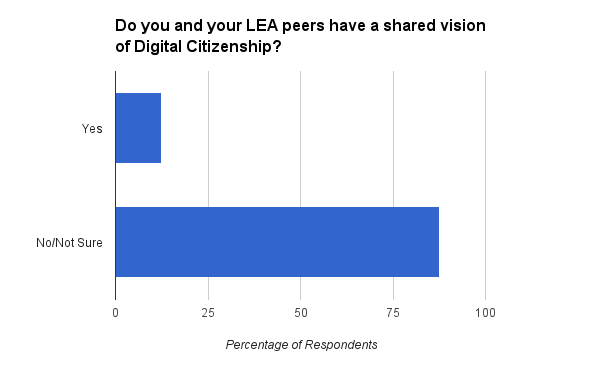
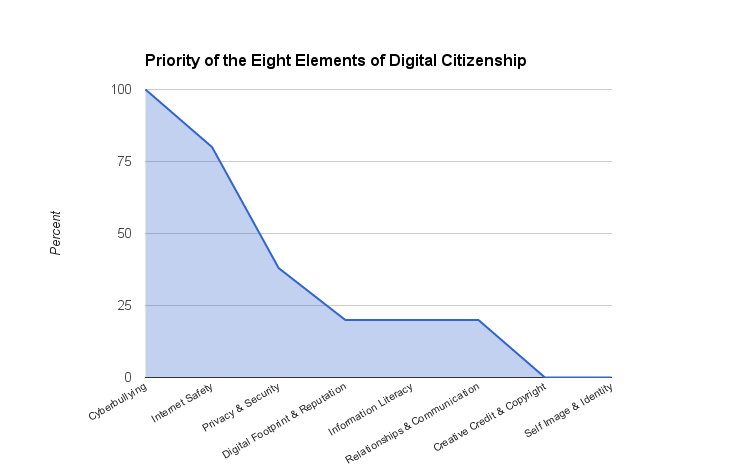
The picture painted by some of the early data shows that the local education agencies are at various places with respect to a shared vision of digital citizenship implementation in the classroom. It appears that a shared vision within districts is not the norm, which should prompt concern among all stakeholders. The way in which respondents prioritized the eight elements of digital citizenship is also notable. To be consistent in the delivery of digital citizenship, is any element more or less important than the other?
This project holds promise for bringing together districts from across Arizona and providing talking points that could lead to positive collaboration and common language among educators. We should applaud the effort and look forward to the data.

Moving Forward
It is becoming clearer everyday that digital learning is on the rise, even if our schools do not provide these opportunities. The 2014 SpeakUp Survey showed that 75 percent of students think every student should have access to a mobile device during the school day to support learning. Many of them have taken matters into their own hands, as 58 percent already use their own smartphones in class and perform such tasks as taking photos of assignments and textbook pages.
So where do we start with such an overwhelming responsibility that affects our classrooms and the teachers that ultimately set the example for our students? A quick Web search will return numerous sites with digital citizenship resources. Common Sense Media is a popular choice and offers scope and sequence materials that are age appropriate for the classroom and a certification program for educators and schools. It takes much more effort, however, to find actual programs that exist in schools-examples of digital citizenship embedded in those teachable moments that are so relevant to our students. We need to shared successful programs and hold them up as models for others to see (#digitalcitizenship).      


A Partnership
Digital citizenship is no different from good citizenship in general-the only distinction is the medium where that community exists. If we expect our students to be responsible members of the digital community, we have to collaborate with all stakeholders to create successful learning opportunities, encourage parental support, lead by example, and include our students in that discussion. Technology is no longer a once-a-week event or a trip to the computer lab; it is embedded in our classroom and personal environments. It will take more than the librarian or tech teacher to instill the values of digital citizenship into the lives of our students and make good digital citizenship part of the Big Four.

Thursday, June 30, 2016

The ISTE Blues

Data Overload
Like most of us returning from ISTE, you are probably experiencing the emotional roller coaster ride that accompanies the flight or drive home. The data overload from the content filled sessions, keynotes, poster and playground spaces, and endless conversations can be overwhelming. It is possible to keep the "ISTE's Over Blues" from setting in, but do not put it off for later, jump into your content while it's fresh and take charge! 

From the Middle
It doesn't matter what your role is in your organization, you have just spent four days gathering content that you need to share. Take the lead from the middle approach and decide how you can share what you have learned with your peers, administration, technology staff and any others that could benefit from what you have learned. This could also be an opportunity to use a new medium to share information with a presentation platform, blog site, or creative new app that you experienced at the conference. With the pace at which new technologies and classroom practices evolve, technology, curriculum, and professional development teams will appreciate the benefit of the information you provide. 

Stay in Touch
I have said a number of times that the best place to make connections at ISTE is standing in line waiting to purchase that delightful ice coffee or refreshing bottle of water. I do suggest we change the phrase "standing in line" to the "PLN line", because we ultimately exchange email addresses, Twitter and Instagram handles and district names for future collaboration, with educators from around the globe. Now that you have these new contacts, don't hesitate to reach out and continue the conversations and sharing of ideas that you started while waiting in that PLN line.
The power of social media can assist, so take advantage of the new account you just created in those power sessions and use the #ISTE2016 hashtag to share with your new friends. 

Bring ISTE Home
Coming together with 15,000 like minded educators is something magical that ISTE has
managed to create for many years. What many ISTE members may not be aware of is the ISTE affiliate groups that exist in virtually every state in our country, as wells as international affiliates in Australia, Canada, Europe, India, The Philippines, and the United Kingdom. These affiliate groups are all a bit different and have a variety of benefits and professional development opportunities that happen year around. Joining a local affiliate is another way to continue to grow your PLN, attend events in your state and become involved with advocacy movements that can directly affect your classrooms and students. To find an affiliate in your area, check out the affiliate directory and continue making connections!

Small World
CC BY-SA 3.0
Staying relevant in a world continually growing smaller is not an easy task and each new generation of students brings a fresh mindset that as educators we must be able to connect with. Attending events like ISTE, connecting with others through social media, and remaining outside of the four walls of our classrooms, cubicles and offices, will allow us to continue growing and remain the most important part of the classroom. See you in San Antonio!